> ## Documentation Index
> Fetch the complete documentation index at: https://docs.useflytrap.com/llms.txt
> Use this file to discover all available pages before exploring further.

# Use Flytrap with Rollup

> Use Flytrap to catch & replay both front-end & back-end bugs with a Rollup bundled program

## Installing

Install the `useflytrap` package to your project.

<CodeGroup>
  ```bash npm theme={null}
  npm install useflytrap
  ```

  ```bash yarn theme={null}
  yarn add useflytrap
  ```

  ```bash pnpm theme={null}
  pnpm install useflytrap
  ```
</CodeGroup>

## Add Flytrap code transform

Add the Flytrap code transform to your Rollup configuration, so that all your code gets properly processed for replaying. This is an example configuration of using Rollup with an Express API.

<CodeGroup>
  ```typescript rollup.config.js theme={null}
  import typescript from '@rollup/plugin-typescript'
  import nodeResolve from '@rollup/plugin-node-resolve'
  import commonjs from '@rollup/plugin-commonjs'
  import { FlytrapTransformPlugin } from 'useflytrap/transform'

  export default {
  	input: 'src/index.ts',
  	output: {
  		file: 'dist/index.cjs',
  		format: 'cjs'
  	},
  	plugins: [
  		typescript(),
  		// only add in production
  		...(process.env.NODE_ENV === 'production' ? [FlytrapTransformPlugin.rollup()] : []),
  		nodeResolve({ preferBuiltins: true, extensions: ['.mjs', '.js', '.json', '.node', '.ts'] }),
  		commonjs()
  	],
  	external: ['express']
  }
  ```
</CodeGroup>

<Info>Keep in mind that the Flytrap Transform should come before plugins such as `nodeResolve`, so we don't wrap imported node modules.</Info>

<Snippet file="create-config.mdx" />

## Catch your first bug

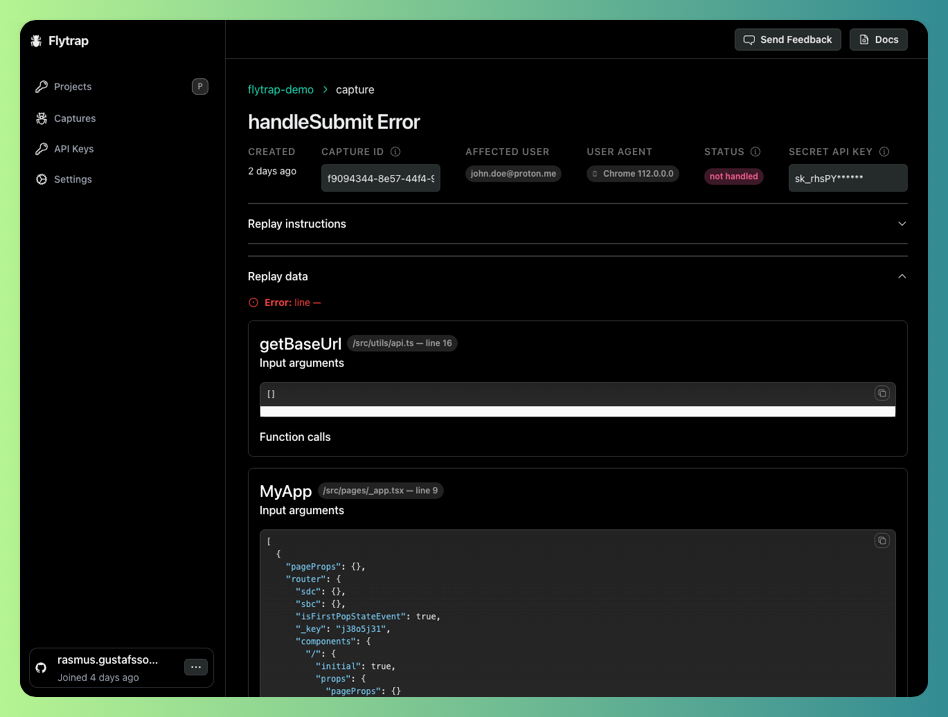
Now your app will be enabled with Flytrap. You can test out the setup by throwing an error in your development environment.
<img height="200" src="https://mintcdn.com/flytrap-98/_ZYKplWiYxS4sMge/images/dashboard/capture.png?fit=max&auto=format&n=_ZYKplWiYxS4sMge&q=85&s=ce61d7b322d5d0cb849a4c651416a277" className="rounded-lg" className="rounded-lg" data-path="images/dashboard/capture.png" />

## Example

<Card
  title="Rollup usage example"
  icon={
	<svg width="24px" height="24px" viewBox="0 0 32 32" xmlns="http://www.w3.org/2000/svg" xmlns:xlink="http://www.w3.org/1999/xlink"><defs><linearGradient id="a" x1="13.146" y1="-186.913" x2="20.701" y2="-188.679" gradientTransform="matrix(1, 0, 0, -1, 0, -170)" gradientUnits="userSpaceOnUse"><stop offset="0" stop-color="#ff6533"/><stop offset="0.157" stop-color="#ff5633"/><stop offset="0.434" stop-color="#ff4333"/><stop offset="0.714" stop-color="#ff3733"/><stop offset="1" stop-color="#f33"/></linearGradient><linearGradient id="b" x1="11.963" y1="-184.409" x2="25.504" y2="-194.908" gradientTransform="matrix(1, 0, 0, -1, 0, -170)" gradientUnits="userSpaceOnUse"><stop offset="0" stop-color="#bf3338"/><stop offset="1" stop-color="#f33"/></linearGradient><linearGradient id="c" x1="12.406" y1="-186.476" x2="14.368" y2="-188.536" xlink:href="#a"/><linearGradient id="d" x1="15.974" y1="-190.023" x2="15.385" y2="-181.584" xlink:href="#a"/><linearGradient id="e" x1="13.423" y1="-186.331" x2="16.211" y2="-188.227" gradientTransform="matrix(1, 0, 0, -1, 0, -170)" gradientUnits="userSpaceOnUse"><stop offset="0" stop-color="#fbb040"/><stop offset="1" stop-color="#fb8840"/></linearGradient><linearGradient id="f" x1="16.279" y1="-175.614" x2="13.434" y2="-206.915" gradientTransform="matrix(1, 0, 0, -1, 0, -170)" gradientUnits="userSpaceOnUse"><stop offset="0" stop-color="#ffffff"/><stop offset="1" stop-color="#ffffff" stop-opacity="0"/></linearGradient></defs><title>file_type_rollup</title><path d="M26.713,11.219A9.147,9.147,0,0,0,25.52,6.685c-2.016-2.075-6.4-2.556-7.492-.01-1.119,2.61,1.879,5.514,3.189,5.284,1.668-.294-.294-4.121-.294-4.121,2.551,4.808,1.962,3.336-2.649,7.752S8.953,29.322,8.266,29.715a.559.559,0,0,1-.093.049H26.261a.43.43,0,0,0,.383-.623L21.915,19.78a.428.428,0,0,1,.167-.564A9.209,9.209,0,0,0,26.713,11.219Z" style={{ fill: 'url(#a)' }}/><path d="M26.713,11.219A9.147,9.147,0,0,0,25.52,6.685c-2.016-2.075-6.4-2.556-7.492-.01-1.119,2.61,1.879,5.514,3.189,5.284,1.668-.294-.294-4.121-.294-4.121,2.551,4.808,1.962,3.336-2.649,7.752S8.953,29.322,8.266,29.715a.559.559,0,0,1-.093.049H26.261a.43.43,0,0,0,.383-.623L21.915,19.78a.428.428,0,0,1,.167-.564A9.209,9.209,0,0,0,26.713,11.219Z" style={{ fill: 'url(#b)' }}/><path d="M8.266,29.715c.687-.392,5.4-9.714,10.008-14.13s5.2-2.944,2.649-7.752c0,0-9.763,13.688-13.3,20.458" style={{ fill: 'url(#c)' }}/><path d="M9.639,17.449C16.233,5.326,17.1,4.1,20.531,4.1a6.253,6.253,0,0,1,4.8,2.262A9.21,9.21,0,0,0,17.636,2H6.436a.427.427,0,0,0-.427.427V25A67.956,67.956,0,0,1,9.639,17.449Z" style={{ fill: 'url(#d)' }}/><path d="M18.274,15.585C13.662,20,8.953,29.322,8.266,29.715a2.076,2.076,0,0,1-2.453-.245c-.653-.731-1.668-1.913,3.827-12.02C16.233,5.326,17.1,4.1,20.531,4.1a6.253,6.253,0,0,1,4.8,2.262c.064.1.128.211.191.319-2.016-2.075-6.4-2.556-7.492-.01-1.119,2.61,1.879,5.514,3.189,5.284,1.668-.294-.294-4.121-.294-4.121C23.475,12.641,22.886,11.169,18.274,15.585Z" style={{ fill: 'url(#e)' }}/><path d="M10.179,17.989C16.773,5.866,17.636,4.644,21.071,4.644A6.3,6.3,0,0,1,25.192,6.2,6.253,6.253,0,0,0,20.531,4.1c-3.434,0-4.3,1.222-10.892,13.345C4.145,27.556,5.16,28.738,5.813,29.469a1.607,1.607,0,0,0,.314.265C5.553,28.9,5.3,26.962,10.179,17.989Z" style={{ fill: 'url(#f)', opacity: '0.300000011920929', isolation: 'isolate' }}/></svg>
}
  href="https://github.com/useflytrap/flytrap-js/tree/main/examples/with-express"
>
  See how you can use Flytrap with Rollup in an example Express API
</Card>
