> ## Documentation Index
> Fetch the complete documentation index at: https://docs.useflytrap.com/llms.txt
> Use this file to discover all available pages before exploring further.

# Use Flytrap with Nuxt

> Use Flytrap to catch & replay both front-end & back-end bugs in Nuxt

<Warning>Support for replaying with Nuxt is still a work-in-progress.</Warning>

## Installing

Install the `useflytrap` package to your Nuxt project.

<CodeGroup>
  ```bash npm theme={null}
  npm install useflytrap
  ```

  ```bash yarn theme={null}
  yarn add useflytrap
  ```

  ```bash pnpm theme={null}
  pnpm install useflytrap
  ```
</CodeGroup>

## Add Flytrap code transform

Add the Flytrap code transform to your project by editing your Nuxt configuration, so that all your code gets properly processed for replaying.

Add the module to your Nuxt configuration:

<CodeGroup>
  ```typescript nuxt.config.ts theme={null}
  // @ts-ignore
  import { FlytrapTransformPlugin } from 'useflytrap/transform'

  // https://nuxt.com/docs/api/configuration/nuxt-config
  export default defineNuxtConfig({
  	vite: {
  		plugins: [process.env.NODE_ENV === 'production' && FlytrapTransformPlugin.vite()]
  	}
  })

  ```
</CodeGroup>

<Snippet file="create-config-nuxt.mdx" />

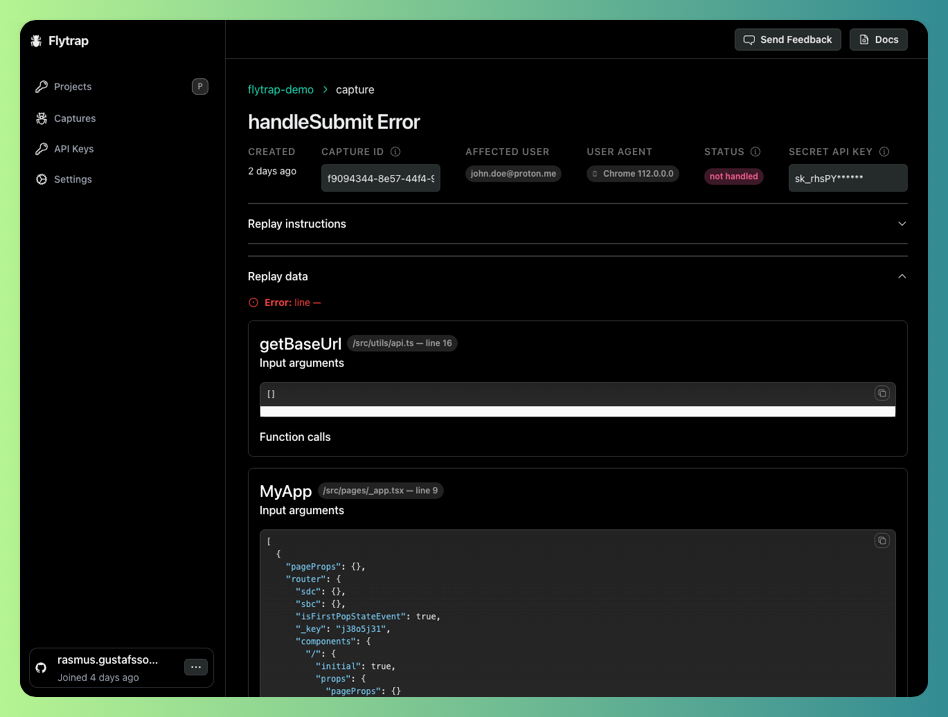
## Catch your first bug

Now your app will be enabled with Flytrap. You can test out the setup by throwing an error in your development environment.
<img height="200" src="https://mintcdn.com/flytrap-98/_ZYKplWiYxS4sMge/images/dashboard/capture.png?fit=max&auto=format&n=_ZYKplWiYxS4sMge&q=85&s=ce61d7b322d5d0cb849a4c651416a277" className="rounded-lg" data-path="images/dashboard/capture.png" />

## Example

<Card
  title="Nuxt usage example"
  icon={
<svg xmlns="http://www.w3.org/2000/svg" viewBox="0 0 400 298"><g fill="none" fill-rule="nonzero"><path fill="#00C58E" d="M227.92099 82.07407l-13.6889 23.7037-46.8148-81.08641L23.7037 273.58025h97.3037c0 13.0912 10.61252 23.7037 23.70371 23.7037H23.70371c-8.46771 0-16.29145-4.52017-20.5246-11.85382-4.23315-7.33366-4.23272-16.36849.00114-23.70174L146.89383 12.83951c4.23415-7.33433 12.0596-11.85252 20.5284-11.85252 8.46878 0 16.29423 4.51819 20.52839 11.85252l39.97037 69.23456z"/><path fill="#2F495E" d="M331.6642 261.7284l-90.05432-155.95062-13.6889-23.7037-13.68888 23.7037-90.04445 155.95061c-4.23385 7.33325-4.23428 16.36808-.00113 23.70174 4.23314 7.33365 12.05689 11.85382 20.5246 11.85382h166.4c8.46946 0 16.29644-4.51525 20.532-11.84955 4.23555-7.3343 4.23606-16.37123.00132-23.706h.01976zM144.7111 273.58024L227.921 129.48148l83.19012 144.09877h-166.4z"/><path fill="#108775" d="M396.04938 285.4321c-4.23344 7.33254-12.05656 11.85185-20.52345 11.85185H311.1111c13.0912 0 23.7037-10.6125 23.7037-23.7037h40.66173L260.09877 73.74815l-18.4889 32.02963-13.68888-23.7037L239.5753 61.8963c4.23416-7.33433 12.0596-11.85252 20.5284-11.85252 8.46879 0 16.29423 4.51819 20.52839 11.85252l115.41728 199.8321c4.23426 7.33395 4.23426 16.36975 0 23.7037z"/></g></svg>
}
  href="https://github.com/useflytrap/flytrap-js/tree/main/examples/with-nuxt"
>
  See how you can use Flytrap with Nuxt
</Card>

<Snippet file="learn-more.mdx" />
